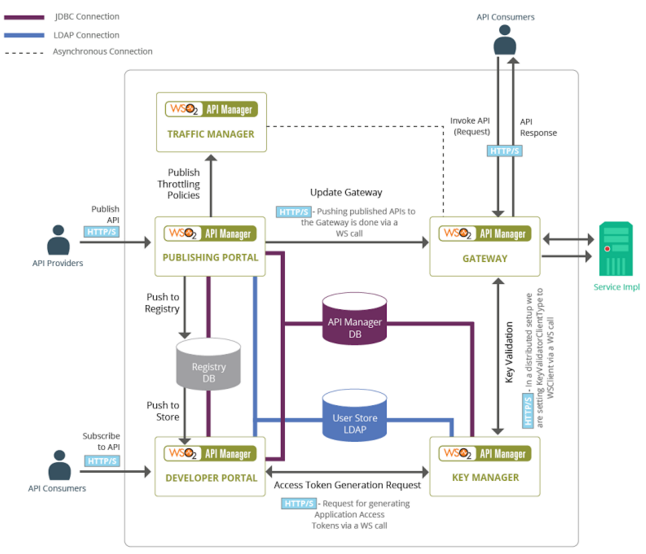
API Store (Developer Portal): Used by API users. Discover, register and subscribe to APIs. URL = https://localhost:9443/store.
API Gateway: Used by API consumers. All the requests comes here and security, throttling enforced here. URL = https://localhost:9443/carbon .
Key Manager:
Used by API Gateway to validate subscriptions, OAuth tokens, and API
invocations. Provides a token API to generate OAuth tokens that can be
accessed via the Gateway. URL = https://localhost:8243/token
Traffic Manager:
Used by API Gateway to enforce throttling. Features a dynamic
throttling engine (Siddhi) to process throttling policies in real-time.
URL = https://localhost:9443/admin
API Manager Analytics: Provides a host of statistical graphs, an alerting mechanism on predetermined events and a log analyzer.
API Manager component interation
WSO2 API Manager Users and Roles
Creator:
Granted permissions to create APIs using the API publisher and view
APIs in API store to understand the feedback of the developed APIs
Publisher: Granted permissions to manage the full API life-cycle from creation on wards.
Consumer:
A consumer uses the API Store to discover APIs, see the documentation
and forums, and rate/comment on the APIs. Consumers subscribe to APIs to
obtain API keys.
Admin: Super user with all the above privileges and administration capabilities
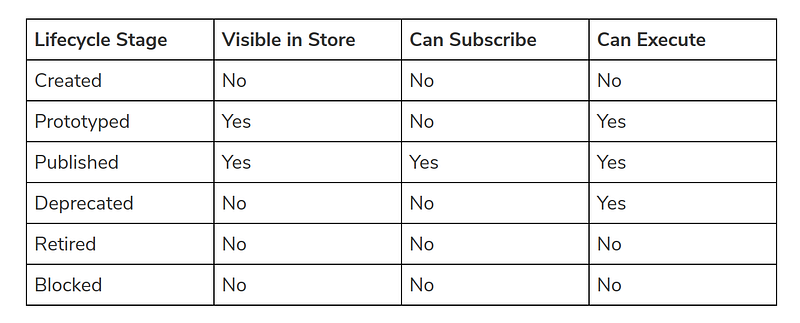
Lifecycle of an API
CREATED: API metadata is added to the API Store, but it is not visible to subscribers yet, nor deployed to the API Gateway.
PROTOTYPED:
The API is deployed and published in the API Store as a prototype. A
prototyped API is usually a mock implementation made public in order to
get feedback about its usability. Users can try out a prototyped API
without subscribing to it.
PUBLISHED: The API is visible in the API Store and available for subscription.
DEPRECATED:
The API is still deployed in the API Gateway (i.e., available at
runtime to existing users) but not visible to subscribers. You can
deprecate an API automatically when a new version of it is published.
RETIRED: The API is unpublished from the API Gateway and deleted from the Store.
BLOCKED: Access to the API is temporarily blocked. Runtime calls are blocked, and the API is not shown in the API Store anymore.
API Lifecycle Visibility
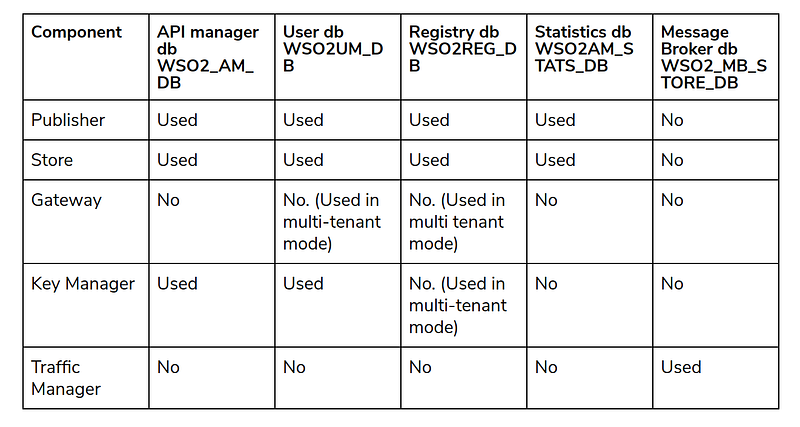
Database configuration for distributed deployment
APIM Database configurations across profiles
In
addition to the above mentioned databases, following databases will be
used based on the usage of metrics and APIM analytics respectively.
metrics database (metrics.xml) — once
you enable metrics and JDBC storage type, you need to configure the
datasource configurations in metrics-datasources.xml file.
analytics database(WSO2_ANALYTICS_EVENT_STORE_DB) — This database needs to be configured at WSO2 APIM anaytics node to store the raw events coming into it.
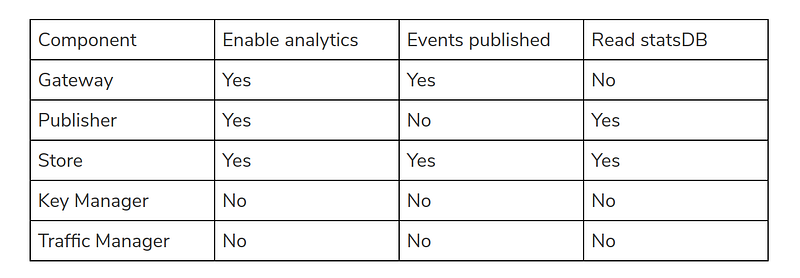
In a fully distributed setup, analytics needs to be configured at each node as mentioned below.
APIM Analytics database configuration
Supported OAuth2 and extended grant types
Authroization Code grant — Validate
application and the end user. Use authorization endpoint
(URL=https://localhost:8243/authorize) to authenticate user and token
endpoint (URL=https://localhost:8243/token) to request the access token.
Password grant — Validate
application and the end user (resource owner). Use token endpoint to
get the access token directly by sending the username and password of
the resource owner along with base64 encoded string of
consumer-key:consumer-secret pair.
Client credentials grant — Validate
only the application (client). Use token endpoint to get the access
token by sending the base64 encoded string of
consumer-key:consumer-secret pair.
Implicit grant — Validate
application and the end user (resource owner). Use authorization
endpoint to get the token by sending the client ID (only) and user is
redirected to provide user credentials. Access token is included in the
redirection URL as a URI fragment.
Refresh token grant — Used
to get a new access token once the existing token is expired. Use token
endpoint to get the new token by sending the refresh token and base64
encoded consumer-key:consumer-secret pair.
SAML2 extension grant — Validate
application and the end user. User will be redirected to IDP to log in
to the system and IDP returns a SAML response to the application (SP).
Application calls the token endpoint along with SAML token (base64 URL
encoded) and consumer-key:consumer-secret pair and get the access token.
NTLM extension grant — Validate
application and the end user. User needs to get an NTLM token from the
running windows server and pass that along with base64 encoded
consumer-key:consumer-secret pair to token endpoint and get an access
token.
Kerberos extension grant — Validate
application (client). Application calls token endpoint to get access
token by sending base64 encoded consumer-key:consumer-secret pair along
with kerberos ticket received from KDC (Key Distribution Centre).
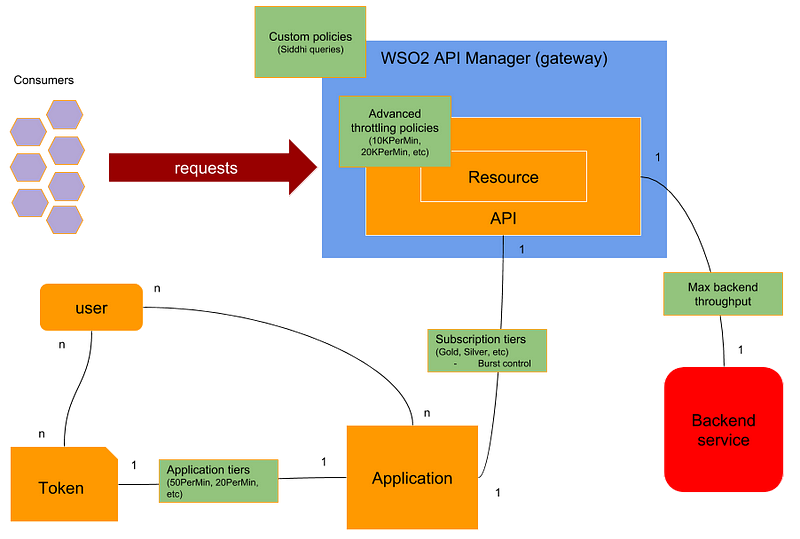
WSO2 API Manager throttling capabilities
How throttling is related to applications, users and back end systems
Application
-> API throttling — Subscription tiers are available when an
application subscribe for an API. Burst control can be configured at
subscription tiers.
Application -> Token throttling — Different throttling levels are available per token when creating an application
All
consumers -> API/Resource throttling — Advanced throttling tiers are
available at API/Resource level for all the external consumer requests
All
consumers -> All APIs throttling — Custom throttling policies are
defined globally which are applicable for all APIs for all consumer
requests
API -> back end throttling — Requests going from API to a backend can be throttled with a max back end throughput
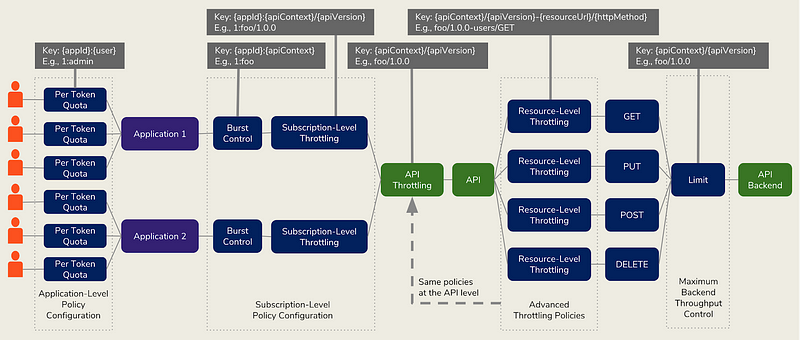
API throttling flow
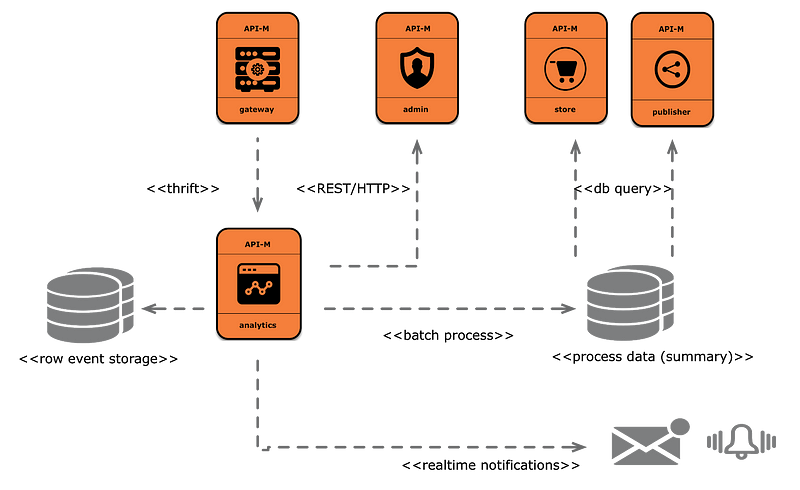
WSO2 API manager analytics
API Analytics architecture
Raw events are stored in WSO2_ANALYTICS_EVENT_STORE_DB database which is configured within the analytics profile.
These events are processed using spark scripts and processed data is stored into the WSO2AM_STATS_DB database.
Processed data will be retrieved by the API publisher and API store to showcase the API statistics
Siddhi
runtime included within the analytics component analyses the incoming
events and send realtime notifications based on the conditions
configured in the node.
Nice and good article. It is very useful for me to learn and understand easily. Thanks for sharing your valuable information and time. Please keep updating mulesoft Online Training
In a typical enterprise information system, there is a high chance that people will use different types of systems built by different vendors to implement certain types of functionalities. The APIs might be hosted in an API Manager developed by vendor A and the user management can be implemented using a different vendor (vendor B). In this type of a situation, one system will not be able to directly contact the other system but they want to use both systems in tandem. Self-contained access tokens are used in these types of situations where applications can get the token from one system and use that in another system to access protected resources. In this scenario, the second system does not need to make a contact to the first system over the network to validate the user information since the token is self-contained and it has relevant details about the user. This will improve the token processing time significantly since it completely removes the network interaction. The below fig...
When you are creating REST APIs with WSO2 ESB, you may need to send some response message back to the user when something goes wrong. In this kind of scenario, you can create a payload inside the ESB and send it back. For doing this, you can use the below configuration. <api xmlns=" http://ws.apache.org/ ns/synapse " name="LoopBackProxy" context="/loopback"> <resource methods="POST GET"> <inSequence> <property name="NO_ENTITY_BODY" scope="axis2" action="remove"></property> <log level="full"></log> <payloadFactory media-type="xml"> <format> <m:messageBeforeLoopBack xmlns:m=" http://services...
WSO2 ESB has defined some configuration parameters which controls the timeout of a particular request which is going out of ESB. In a particular scneario, your client sends a request to ESB, and then ESB sends a request to another endpoint to serve the request. CLIENT->WSO2 ESB->BACKEND The reason for clients getting timeout is that ESB timeout is larger than client's timeout. This can be solved by either increasing the timeout at client side or by decreasing the timeout in ESB side. In any of the case, you can control the timeout in ESB using the below properties. 1) Global timeout defined in synapse.properties (ESB_HOME\repository\conf\) file. This will decide the maximum time that a callback is waiting in the ESB for a response for a particular request. If ESB does not get any response from Back End, it will drop the message and clears out the call back. This is a global level parameter which affects all the endpoints configured in ESB. synapse.global_timeout_inte...
Nice and good article. It is very useful for me to learn and understand easily. Thanks for sharing your valuable information and time. Please keep updating mulesoft Online Training
ReplyDeleteNice information thank you,if you want more information please visit our link salesforce online course Hyderabad
ReplyDeleteIt is so nice article thank you for sharing this valuable content
ReplyDeleteMulesoft Online Training in India
Mule ESB Training